
USE CASES / HR & ONBOARDING FORM FILLER
Fill Onboarding Forms Faster and Get New Hires Working Sooner
Simplicity AI turns the onboarding packet into guided forms a new hire can finish on day one: W-4, I-9, direct deposit, and W-9 when the person is a contractor. Fewer forms chased, fewer sent back, and a first paycheck that lands on time.
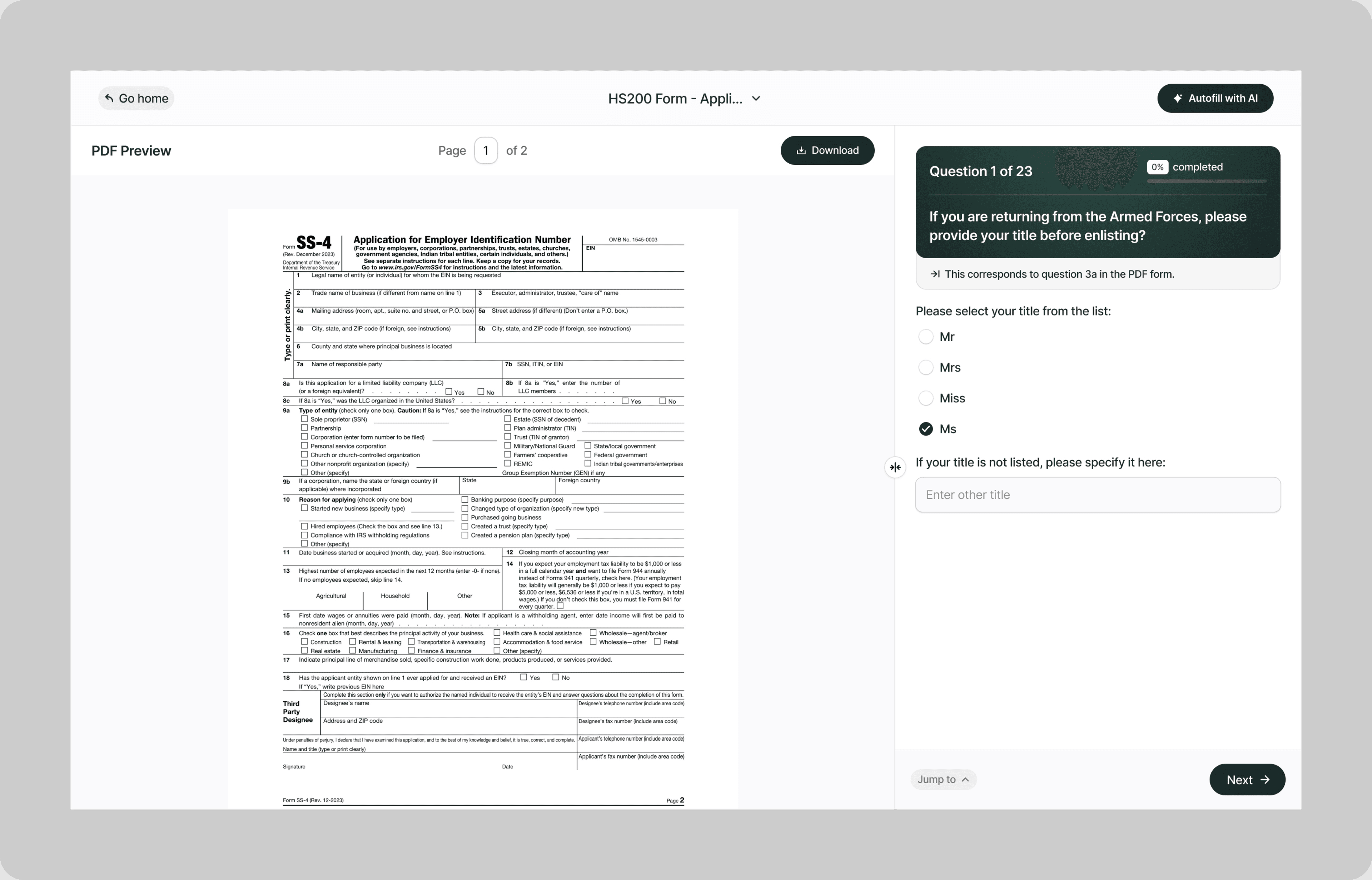
Onboarding paperwork is the last thing between a signed offer and a productive employee, and it is almost always the part that slips. The forms come from different agencies, they carry different deadlines, and one wrong box sends the whole packet back.
Simplicity AI reads each form, turns it into plain-English questions, and carries the details a new hire has already given across the rest of the packet. HR gets a complete, signed set on day one instead of a fortnight of reminders.
The Problem with Onboarding Forms
- An onboarding packet is rarely one form and rarely one deadline:
- Every form comes from a different place, with its own rules about who signs and when
- The same name, address, and identifiers get retyped four or five times across a single packet
- Employee forms and contractor forms look similar and are not interchangeable
- An incomplete packet delays the first payroll run, which is the part the new hire actually notices
Every form that comes back incomplete is a day the new hire is on your payroll system but not on your payroll.
How Simplicity AI Solves It
- With Simplicity AI, the packet stops being a chase. The AI:
- Reads any onboarding PDF and converts it into a guided questionnaire
- Carries names, addresses, and identifiers across every form in the packet
- Keeps the employee track and the contractor track separate
- Captures signatures in the browser, including the sections the employer completes
- Exports a clean, complete set for your records
How to Fill Out Onboarding Forms Online Using Simplicity AI
1
Upload your onboarding packet, or pick the forms you need. Simplicity AI reads each PDF and turns it into a guided questionnaire.
2
Say whether the new hire is an employee or a contractor. That single answer decides which forms open and which stay closed.
3
The new hire answers in plain English once. Their name, address, and identifiers carry across every form in the packet.
4
Both sides sign in the browser, including the sections the employer completes rather than the employee.
5
Download the finished packet as one set, or export each form on its own for whichever system keeps your records.
Key Benefits of Using Simplicity AI to Fill Onboarding Forms

Faster First Payroll
A complete packet on day one means the new hire makes the first payroll run rather than the next one. That is the part they remember about their first month.

Fewer Forms Sent Back
Missing boxes, mismatched names, and unsigned sections get caught before the packet leaves your desk, not after it reaches your payroll provider.

One Set of Answers
Details entered once carry across every form in the packet, so nobody types the same address five times and no two forms disagree with each other.

Two Tracks, Kept Apart
The employee track opens a W-4 and an I-9. The contractor track opens a W-9. Nobody lands on the wrong form because the answer came first.
Get your next new hire through the paperwork on day one.
FAQs
Frequently Asked Questions About Filling Onboarding Forms with AI
Which forms does a new employee need on day one?
At minimum a Form W-4 for federal withholding and a Form I-9 for employment eligibility, plus whatever direct deposit form your payroll provider uses. Your provider will tell you whether your state adds its own withholding form on top.
Does a contractor fill out a W-4?
No. Contractors complete Form W-9, which collects the taxpayer identification number you need to issue a 1099. A W-4 is for employees whose employer withholds tax from their pay.
Who completes Form I-9?
Both sides. The employee completes one section and the employer completes another, and each section has its own deadline. Our Form I-9 page covers the timing in detail.
Can a new hire complete the packet before their first day?
The packet can be prepared and sent in advance. Form I-9 has its own rules about when each section may be completed, so check those on the Form I-9 page before asking anyone to fill it in early.
Can HR complete these forms on behalf of an employee?
Parts of them. Some forms carry a declaration only the individual can make, and a signature that cannot be typed or stamped on their behalf. Simplicity AI shows each party only the sections that belong to them.
Can we onboard several people at once?
Yes. One packet generates a separate set of forms for each new hire, so a cohort starting on the same Monday is one job rather than ten.
What do we keep after onboarding?
Whatever your retention policy and the law require, which differs by form. Simplicity AI exports a clean PDF of every completed form so your records match the packet you actually sent.
Is our data safe when we use Simplicity AI for onboarding?
Yes. Onboarding forms carry Social Security numbers, identity documents, and bank details. Simplicity AI encrypts your files, controls who can access them, and never shares your documents or uses your data to train AI models.
Common Onboarding Form Mistakes (and How AI Prevents Them)
Putting a contractor on a W-4
This is the error that costs the most to unwind. A contractor completes a W-9 so you can issue a 1099, not a W-4, and paperwork that treats them as an employee sets up a mismatch that surfaces at year end when the forms do not agree with how they were paid. Simplicity AI asks which one the person is before it opens anything.
Treating the I-9 as the employee’s job alone
Form I-9 has a section the employee completes and a section the employer completes, each with its own deadline. Packets come back with the employee half done and the employer half blank, which leaves the form incomplete. Simplicity AI routes each section to whoever has to sign it.
Retyping the same details across the packet
A single packet asks for the same name, address, and identifiers four or five times, and each retype is a chance for two forms to disagree. Simplicity AI carries one set of answers across every form so the packet stays internally consistent.
Sending the packet after the start date
Paperwork that starts on day one finishes after day one, and the first payroll run does not wait. Preparing the packet before the start date is the whole difference between a new hire being paid on schedule and being paid a fortnight late.
Accepting a typed or stamped signature
Several onboarding forms carry a declaration the individual signs personally, and a typed or stamped name is not a signature on those. Simplicity AI captures a real signature in the browser and will not export a form that still needs one.
Onboarding a cohort one person at a time
Five people starting on the same Monday means five packets built by hand, and the fifth one is always the one with a missing form. Simplicity AI generates a separate set per new hire from one template.
Losing track of which forms came back
A packet is only finished when every form in it is finished, and partially returned packets sit in inboxes for weeks. Simplicity AI produces the set as one export so what is outstanding is visible rather than assumed.

Healthcare form AI filler
Popular Forms
Popular forms ready for you to fill Instantly
Find commonly used government, legal, and official documents, already optimized for fast, stress-free filling with Simplicity AI. We've made them easier, smarter, and faster so you can move on with your day.
Tax Forms
Immigration Forms
Healthcare Forms
Employment Forms
Legal Forms
Motor Vehicle Forms
Experience instant PDF form filling with AI
Developers
